Glock Paper Scissors Sprints
Sprint 1
Welcome to looking back on Sprint 1 of Glock Paper Scissors from the programming perspective. This sprint was focused on setting up the main basics of the game and seeing how much I can get done.

This sprint was started by assigning me the cards for setting up a collaborative unity project (which included our GitHub), basic gun start, creating a working player character, and working on their stats like stamina and health. Admittedly working on the working player character took a bit in order to make a player that moves not only with keyboard input but in direction of where the camera itself was facing. In hindsight, making the movement after making the camera controller would have made programming it a lot easier.
Once that was finished though, Trevor (our other programmer) had finished his enemy script allowing me to work on getting player health to work. It didn't take long to make; however, it did teach me that "On Trigger" and "On Collision" have a stay variant which works very well for players staying in an enemy hitbox. Missed it before somehow, but with it known it makes the biggest challenge of making health work really just the invincibility timer. The invincibility timer makes it so a player doesn't immediately die upon staying in an enemy but is really simple to make.
That left the gun for the cards initially assigned. Getting the gun to shoot was the easy part, but the fun part was figuring out how to get the bullets to go in the right direction or stack on each other. The issue of the latter was solved first, as it was a simple issue of having a kinematic rigidbody which caused the bullets to staircase up on each other. The bigger issue of getting the bullets to shoot the direction of the player was caused by not being able to use the same code plan as the main player movement code. Which then lead me to realize I could just set the movement of the bullet to be based on the rigidbody, which could be rotated to be faced the same way as the player when spawned. This probably could have been a simpler way to also make the player movement in hindsight.
At this point there was still more to the sprint so additional cards got assigned to me. As also seen above, swapping between the three bullet types was added which was pretty simple. With that, the rest of the sprint was dedicated to working on enemy spawner and the wave mechanics, which is currently in progress still.
Overall, this sprint went pretty well. I feel like I could have gotten more work done, such as finishing the three enemy spawner points assigned to me. However, the work that was done doesn't feel buggy and the main issues that would probably arise from it are just raw values of what stats for the player are going to feel good which will just take time to playtest. This next sprint I plan to try to get more done to fit what I can do.
Sprint 2
Welcome to the end of GPS's second sprint. This sprint I got a bit more completed than last sprint, although I could have done a bit more.

This sprint, I finished the enemy spawner, some of the user interface, 3 of the power ups, player respawn, and added health regen. The enemy spawner was finished after starting it the sprint prior, but the rest of what I did start to work on this sprint I got done this sprint.
The enemy spawner was a pretty fun one. Most of the work on the enemy spawner was in the script itself. The script holds two sets of game object variables, one for the enemy prefabs that will be spawned, and one for the Game Manager. These enemy prefabs are then spawned in a random spot around the Game Manager, and as of this sprint they will immediately start tracking the player. (This changed at the start of the next sprint) They are spawned one at a time with a random chance of any of the current enemies being spawned. There is a quick cooldown function as well just so the game knows when to spawn enemies and not just spawn an army on the player. In hindsight, I'd like to have added a variable to allow the other developers to change how many enemies are spawned at once on a wave. This would need a single int variable that they can control connected to and a for loop for spawning enemies in the update function. So, it'd be pretty quick to do if we need it in the future.
The Game Manager's main use as a variable is letting that the Game Manager was given two int variables where one variable has to track the current number of spawners in a level, and the second shows how many have had all of their minions in the current wave killed. The way this currently works is the script checks to see what the current total amount of spawned enemies are and compares it with the max number of enemies capable of being spawned this wave and sees if the amounts are equal. (Or greater just in case of a glitch somehow occurring) With that, there's another int tracking how many enemies are currently spawned, and if that amount is 0 or somehow less than 0 the spawner's wave is considered finished, and the Game Manager's spawner finished count goes up. Once the spawners finished equals current spawners on the level, the Game Manager increases the wave count and if the game is continuing the number of enemies spawned is increased. They are increased by addition so that they don't get to an impossible number of enemies to kill.
The user interface (as I've been calling it), mostly consists of what the player needs to see when in-game. This would be the hp (so they know if they're going to die), stamina bar, wave, and kill count. While these most likely aren't the final versions of this UI, the code used to make them isn't going to be wasted either. The health and stamina will still be shown as bars, and the enemy kill count will be used for the score counter even if the kill count specifically disappears in later versions. The waves will probably stay the same. The code easily took a bit longer than setting up the actual on scene version of the UI.
There isn't actually much to say about the wave count or kill count. The game manager already holds the wave count, so the wave count UI just grabs the current wave count from the Game Manager script. Likewise, every enemy spawner has access to the Game Manager, so I gave the Game Manager script an int variable for kill count. That way all I had to do was put in the Enemy Spawner script that every time an enemy is moved to the dead list, the Game Manager's kill count variable goes up by one. At first, I tried putting the counter for whenever the enemies were destroyed, but the dead list doesn't actually see the enemies as dead after destruction so it would infinitely count up once an enemy was killed. Small problem but at least had an easy fix.
The health bar to me was a bit more interesting. The way the health bar works is that there's just a game object with a slider + health bar script, a black border object, and the red health bar itself. It really isn't complicated, but I didn't realize there was a UI element (slider) dedicated to allowing you to make a slidable bar until this point. The slider component allows you to control which direction the bar slides, and how much of the bar can slide. By then making a health bar script, you can set the values of how much of the health bar there is (the health point total) by grabbing the player's max hp. There are two total functions one for grabbing the max health value, and one for grabbing the current health value. Whenever the player takes damage or respawns, you can then just put into the current health by setting the slider's value to current health in the respective function. There's also a way to change the color of the bar, but I won't be learning how to use that until next sprint.
The stamina bar meanwhile doesn't have much to note. It's a different script and bar, but the contents of the script are almost identical to the hp script. This is because by instead inserting the max player stamina and the current player stamina (instead of hp) you can get results that work perfectly for tracking a player's stamina. In hindsight however, I probably could have combined the two scripts and made a single empty game object to hold that script. On the other hand, its current form instead gives easier access to whichever script I need specifically in case one needs to be changed or breaks.
After the User Interface, I quickly worked on a respawn mechanic for the player. As of sprint 2, it was decided there wouldn't be a live system rather when the player respawned it'd reset the level. This meant the player dying would reset their spawn point, their health, their kill count, the wave count, the enemies currently spawned, and the bullets spawned. I realized the easiest way to do all of this, was to tell the Game Manager when the player died. The Game Manager would then reset the wave count for itself (which changes the wave count for every enemy spawner), generators finished to 0, puts the player back on spawn, and destroys all bullets in the same function.
Destroying the bullets is done by checking for their tags (each bullet has its own unique tag) and then destroying them all. Once the Game Manager says the player is dead, the enemy spawner can get this data from the game manager and then kill all of its enemies, reset its wave state, reset its wave count, and also change itself to unfinished if it was already finished. Player Data just has to reset its health and the process is finished.
I finished the sprint up with allowing the player to regenerate health and finished three power ups. The health regeneration was pretty simple, it sets a timer that starts whenever the player gets hit. If this timer ends and the player is under their max hp, they heal a single hp and the timer begins again. If the player gets hit without a shield power up, the timer will reset.
The power ups each were pretty simple to do, especially due to me choosing to implement their code in their respective player scripts instead of giving them unique scripts. The Machine Gun power up went to playerShoot, the shield power up went to playerData, and the speed power up went to playerMovement. (Accidentally perfectly balanced)
This is practically everything. According to Jira I did also swap the project to URP from standard 3D, but that wasn't really all that hard. Especially since I'm already the one who constantly merges the files of all the GitHub branches. (Once again not gone into detail because I don't think it's really worth noting)
There also weren't that many issues this sprint with coding either. Which is why I haven't mentioned them. I did have one issue with the respawn mechanic not resetting the player's position for a while. However, I have zero memory of how I fixed that.
The biggest issue I had with this sprint is that I feel like I could have gotten a lot more done. For context, I use a checklist for myself to set dates for when I feel like I should have each of my tasks done by. The power ups were set up to be finished by Monday. There were a few days where I just started stalling on work which ended up causing me to finish them on Thursday. However, after starting and doing them, I have full confidence I could have finished them on Sunday. If this occurred, I could have probably finished the Pause Menu, Health Kit, and Bullet UI I finished on Sprint 3 at this point by Sprint 2 end. So, in the future I wish to actually keep myself to my schedule, that way I can get more done and ready before the next sprint starts.
Sprint 3
This is the end of the 3rd Sprint, and also the Sprint with my team's first proper electronic prototype. Partially due to this this wasn't the most exciting sprint, but it wasn't too bad of a sprint either.

buttons. This is shown in the above gif.
The final task I completed had no right to take as long as it did. However, putting the enemies counted statistic at the game end screen took a while. This was because I couldn't figure out how to temporarily transfer the value of the stat from one screen to another. I tried making it its own script, attaching it to an object, and then transferring that object between scenes to get read. This and a few other solutions I tried didn't work. So, I ended up settling for using a public static script, and a public static variable that would contain the enemies counted which the UI would then read. I still wonder if there was a way to do that code that's more efficient. That's all I finished this sprint. As said, wasn't as much as last sprint or really as glorious in terms of what I was doing. But it was less to make new content for the game and more to help for getting accurate information from the playtests. That, and we really didn't need anything else new to be tested for this playtest either since this will give us a knowledge of how the base mechanics of the game feel. For that reason, I'm fine with the amount I got done and what I got done.


This is the end of Sprint 6, and the beginning of the fixer up Sprint 7. This sprint went pretty well for the most part and was just adding the rest of the main components we were missing.
This sprint, I worked on and finished 9 points of work, which I have come to accept was just my golden standard this semester. While I do wish I got more done, we ended up getting everything we wanted done and the game isn't breaking at the seams so I'm happy with the results.

Of those 9 points (as seen above) I finished by adding a quick difficulty system and updating the new level 4/5. Then I added starter gun animations after some confusion, an end game screen (which would pop up after level 5), visual impact for the bullets, and the boss movement.
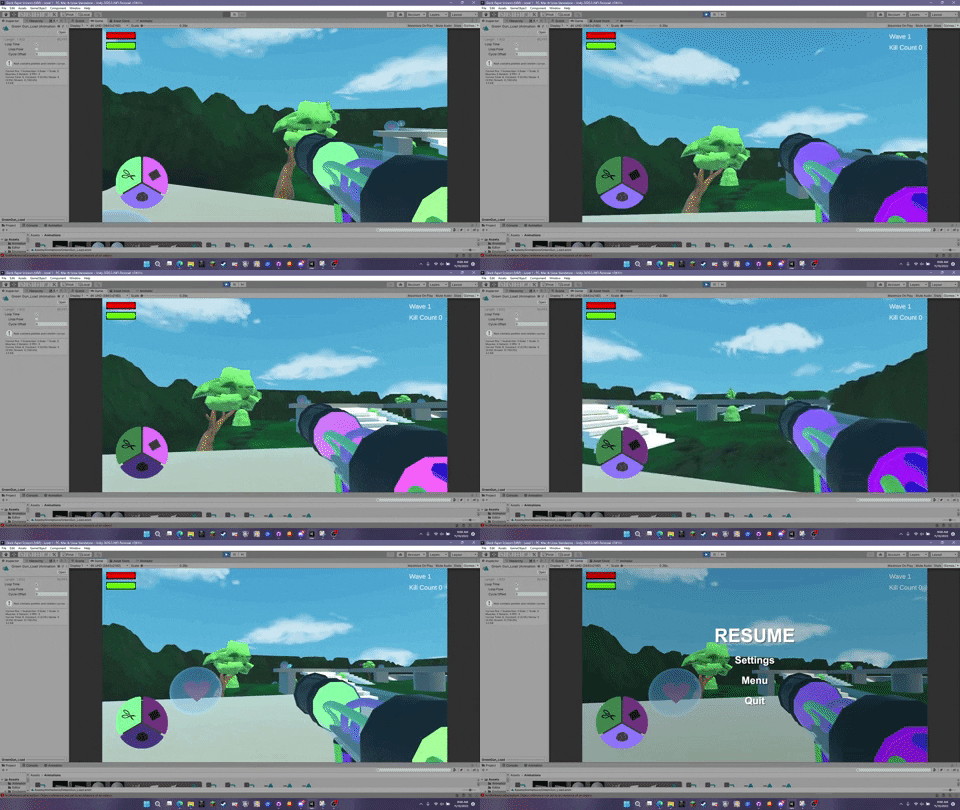
Of those I'll start by mentioning the starter gun animations. This was the most difficult task by far for two reasons. One, I actually have almost never used animator to this point, so I was trying to figure out animator. Alongside this, there was some confusion and I thought I needed to make the animation. (There was already an animation made) That was on me, lesson that I've learned is always check on the task status with the lead for these types of assignments before diving in.

So, starting with animator I ended up getting it to work with some difficulty. (And trying it on every gun) What I ended up doing was making the animations their own thing in animator, from there you can just add them into the asset list as their own asset. (My version would be replaced by the real deal once I learned they existed) Then I made a controller for these guns and made the guns children of that controller. That allowed me to make a single script to control them all instead of one by one. I set them to a trigger (which is what the cyan any state leads to) and then leads them to exit to end the loop. This was the bane of my existence when I first did it for the below reason.
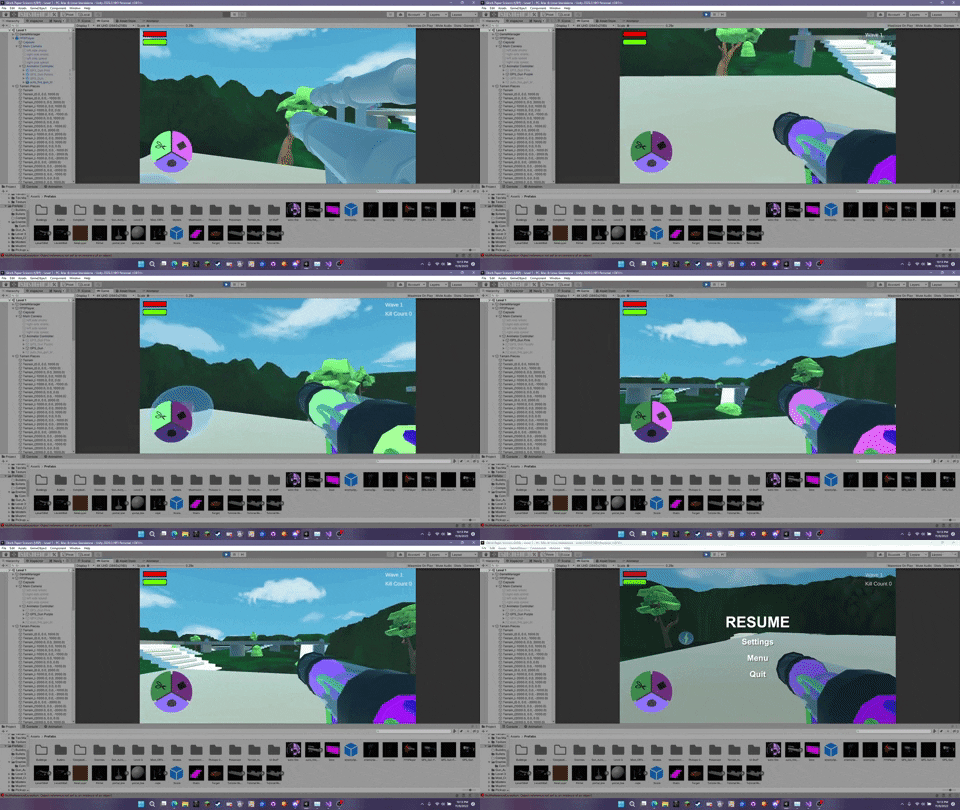
I could only get the animation to either loop twice or by shortening the timing, skip the animation altogether. I couldn't figure out the solution for this at all, until I learned about us having actual animations. I can only guess the issue had to do with my version of the animations as once we put in the proper animations, it became fixed. Albeit it did eat up a bit of time by this point.

Adding the level difficulty was much easier in comparison. The code half of it was created by adding a static variable for difficulty in the static script containing score count. By doing this, as long as the player chose a difficulty by going to level select, the levels could then use that difficulty to give the player what they wanted to play through the game with. From here scripts just check to see what difficulty the variable is set on to change the settings. Currently it only changes the wave count.
The UI meanwhile was changed to allow the player to know what the number of waves are based on level and difficulty.
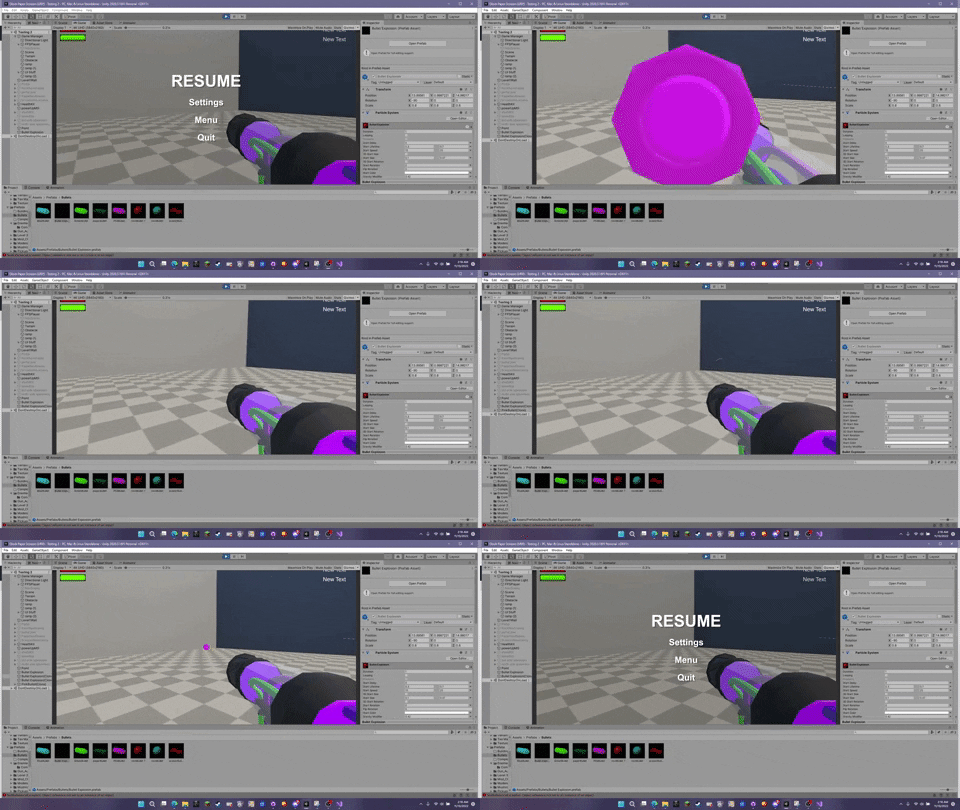
The gun impact is one of the final cards I worked on and is probably the only part I hold actual disappointment on aside from what level difficulty could have also changed if we made it earlier to make sure what difficulty changes, we make don't break the game. That being said, it wasn't the highest priority due to being art based so it's nice to have it in the game at all.
The bullet shots are a bit light (they stand out more on the actual levels due to coloration), have less output than they should, and look more like fireworks than sparks. The coloration never felt like it was right as all the colors I tried turning it felt dull, so I ended up settling on red. Red while not the best on the testing level stands out heavily in the actual gameplay levels.
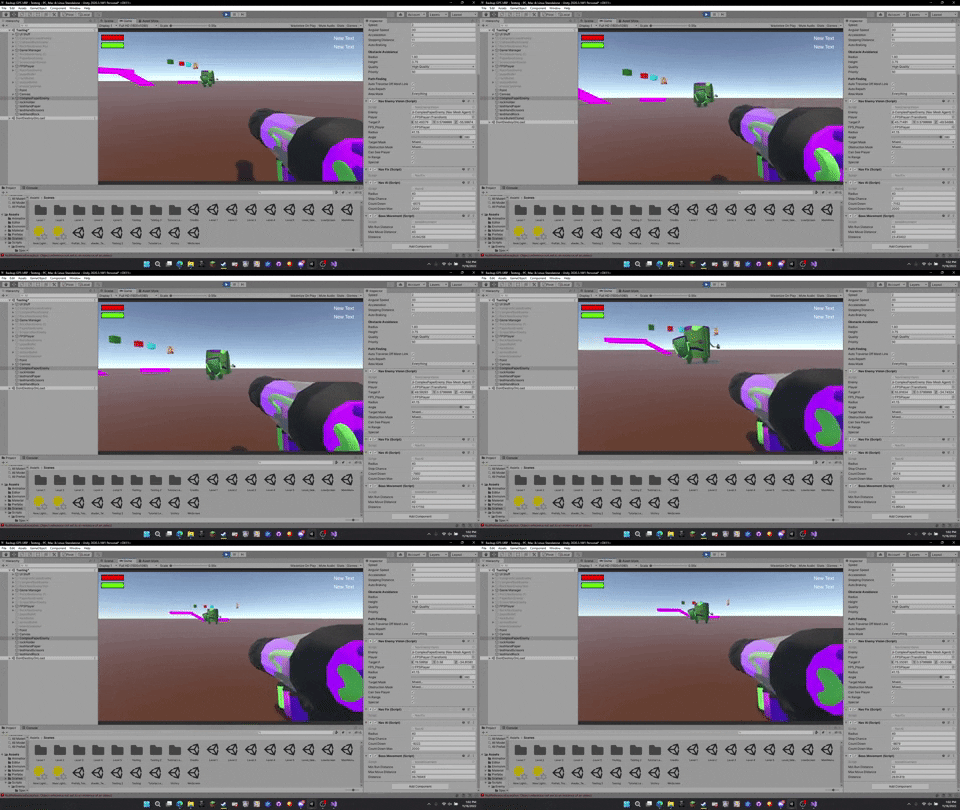
From there, the rest of the points didn't have much difficulty and by this point had a solid foundation, so they were quickly made. For example, the boss movement already had a solid base in the volcano script which also already kept steady with the player. This can be seen above (worth noting this was before the merges so it used a placeholder for the boss)
Level 4 and 5 just were new levels so they required everything to be added to them and checks to make sure they were working properly. They both came in too big, so they were resized. They used the same process to make the wave system work and portal work as levels 1-3 so all fine here.

Finally, this is the screen that will pop up for beating the game. With that, this sprint ended pretty quickly so we're looking forward to polishing up the game and ending on a positive note with the game.

Comments
Post a Comment